A calculator for iPhone & iPad

Remember what
your numbers mean.

Add notes to numbers, keep the steps, and total a whole page. OmniCalc makes everyday costs and calculations easier to come back to.

Free · iOS / iPadOS 17.0 or later · English / 中文

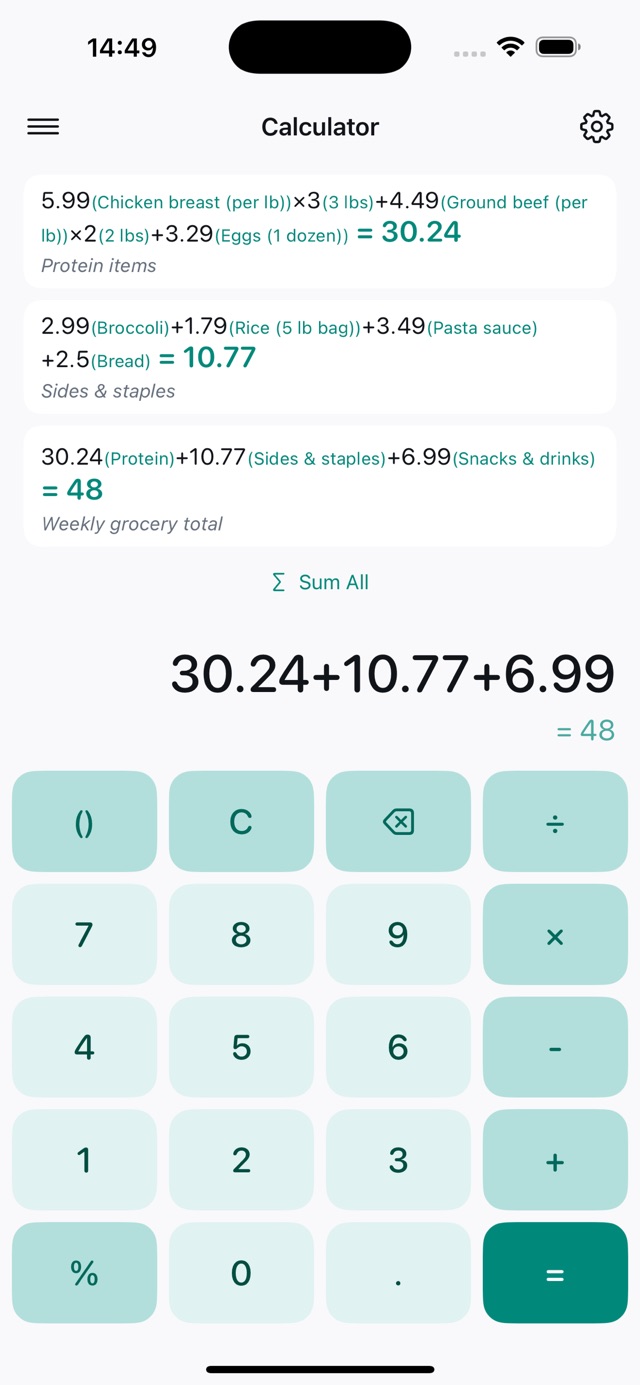
OmniCalc grocery budget screen with ingredient notes, saved calculations and a page total
Actual screen from the current App Store listing

Give numbers a meaning

Label a unit price, quantity, or delivery charge. Add a note to the whole calculation, too.

Keep the steps

Save separate calculation pages, search your history, and reopen a calculation to make changes.

Total related costs

Calculate each expense separately, then add the results on the current page with one tap.

A shopping list
you can check later.

48 × 3 means more with “storage box price” and “quantity” beside it. Keep boxes, labels, and delivery on separate lines so each cost is easy to check.

Follow a worked shopping example →
Shopping list · worked example
Boxes · price × quantity48 × 3 = 144
Labels · price × quantity25 × 2 = 50
Delivery12
Total206

Example amounts use the same currency. Three separate expenses total 206.

Keep different calculations in their own place.

Shopping & everyday expenses

Record prices, quantities, and labels, then check the total cost of a list.

Renovation & project quotes

Calculate materials, labor, and delivery separately. Reopen the page when a quote changes.

Costs & product profit

Keep costs and selling amounts alongside their calculations, so you can check each step later.

A few things
before you download.

Can I add notes to individual numbers?

Yes. Add notes to a number or an entire expression to explain a price, quantity, discount, or delivery charge.

Can I save and search calculation history?

Yes. Save calculation pages, search titles and notes, and reopen existing records to continue a calculation.

Does it work offline?

Calculations, notes, and local history work offline. Network features, such as sending feedback, require an internet connection.

Which operations are supported?

Addition, subtraction, multiplication, division, parentheses, percentages, and live result previews. You can adjust decimal places, thousands separators, and keyboard colors.

Are my calculations uploaded?

In the current released version, expressions, results, and notes stay on your device. Usage analytics and feedback you choose to submit are handled as described in the privacy policy.

Make your next calculation easy to revisit.

Start with numbers that have a meaning.

Download on the App Store